 QORPO
QORPOTAMITOS Kids development: a familiar frame around different games
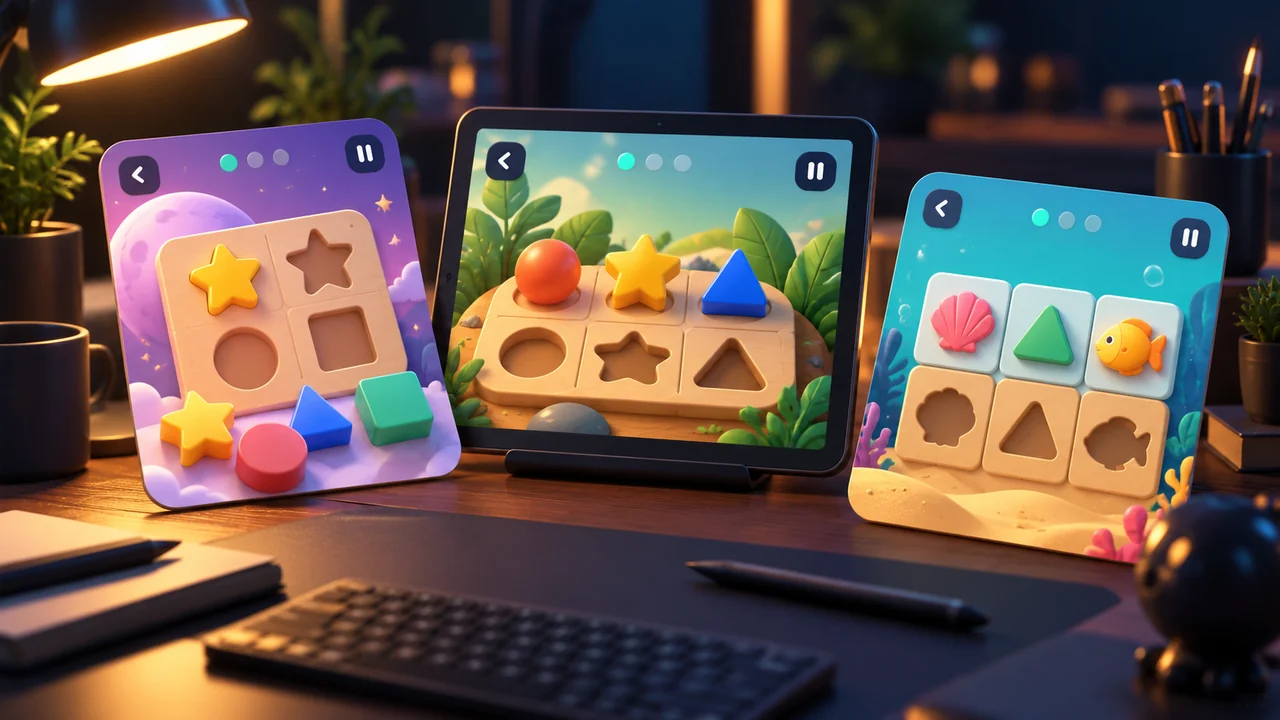
TAMITOS Kids development uses a shared visual frame so children do not have to rediscover the basic controls every time an activity changes. The approved handoff keeps the back button, pause control, short instruction and progress presentation consistent, while each game's objects and illustrated world remain distinct. This is development work on the upcoming app.
We reviewed the late-October UI handoff, shared game-host implementation and visual-proof test definition on 1 November 2026. The public TAMITOS Kids page remains the place to follow product availability. This article does not announce a launch, a completed device audit or measured learning benefits. It explains one specific production decision: reuse the frame without making every activity feel identical.
What stays familiar when the activity changes?
The approved direction places navigation, pause and progress in recognisable locations around the play area. The instruction is a short statement rather than a large panel covering the world. This gives the interface a repeatable structure while leaving room for different activities to present their own objects and actions.
Consistency includes typography. The handoff specifies DynaPuff, including the approved heavy weight, rather than allowing each activity to choose a different font. That is an implementation constraint to check across screens. A shared font name in a design document is not enough if a later screen silently falls back to another face or uses a different visual hierarchy.
Reuse the frame, preserve the activity
There is a practical difference between shared interface components and shared gameplay. A frame can keep a pause control recognisable without dictating how an object is dragged or how a puzzle is solved. The background and interactive content still need to suit the particular activity and its approved art.
The TAMITOS Games overview explains the separate product routes. Kids is the upcoming learning app within that wider world. A shared interface frame inside Kids does not mean it is the same application as the story adventure or that its preview cards are already playable browser games.
Model example: moving from one activity to another
Imagine a review session comparing a shape-sorting screen with a different illustrated activity. This is a model review, not a report of a child playtest. Before judging the content, the reviewer asks where to pause, how to return and how to read the current instruction on each screen.
If those answers depend on remembering a different control layout, the shared frame has not done its intended job. If the controls remain familiar but obscure an important object in the second activity, consistency alone has not solved the layout. The review needs both questions: can the control be found, and does the content have the space it needs?
Short instructions need their own space
A short instruction can still fail if it overlaps the action, wraps awkwardly or changes size unpredictably. Review it alongside the actual objects and counters. Do not approve an empty frame and assume that every later sentence will fit. Localised wording and a compact screen can expose problems that a large mockup does not show.
For a small comparison, capture the instruction at the start of the activity and after its visible state changes. Keep the screen dimensions and text revision with the images. This gives the next reviewer enough context to distinguish a wording problem from a positioning problem. The visual-report guide describes that evidence handoff in more detail.
What the visual-proof tests contribute
The inspected test definition builds individual game screens inside a capture boundary and supports writing proof images. That is useful production infrastructure: a common capture method makes different screens easier to compare. Reading the test tells us what it is intended to capture; it does not establish that every capture has passed review in this editorial run.
The useful next step is to compare a captured screen with its approved reference and the intended interaction. A screenshot can reveal a misplaced control. It cannot by itself prove that pause, return or lifecycle behaviour works correctly. Keep visual review and interaction verification connected without treating either one as a substitute for the other.
Make feedback part of the same design language
The approved handoff also describes calm error responses and attention to motion preferences. Those are design requirements, not evidence of a clinical effect or certification. A consistent frame should support feedback that makes the next action understandable, and the behaviour still needs to be checked on the relevant device and settings.
For production context, the TAMITOS publishing-chain article explains another handoff between preparation and the final output. The same distinction matters here: approved direction, implemented screen and verified experience are different pieces of evidence.
Questions about the Kids interface work
Does a shared frame make every game the same?
No. It provides familiar interface landmarks while the illustrated content and activity remain specific. The review should preserve both recognisability and space for the activity itself.
Is TAMITOS Kids released because code and tests exist?
No. Repository work and test definitions are development evidence. Use the official Kids page for current availability and future announcements.
What is the useful quality check?
Compare the same frame across actual activity screens, then verify the relevant interactions. Keep the approved font, wording, dimensions and state with the evidence. Follow QORPO's studio articles for further explanations of the work behind the products.